Introduction: Have you ever thought about how data gets to its destination safely on the Internet?
Have you ever sent a message, watched a video, or opened a website and wondered how all that data gets to you in the right order and without errors?
There is a sophisticated system behind the scenes that keeps everything running well, and TCP is one of its most vital aspects.
If you’ve seen the phrases “what is TCP,” “what are TCP and UDP,” or “what is TCP and UDP protocol,” you’re not the only one. These ideas may sound complicated at first, but once you get the hang of them, they are actually very easy.
We’ll explain TCP (Transmission Control Protocol) in this article in a style that’s easy for beginners to understand. We’ll cover what it is, how it works, real-world examples, and why it’s important for the internet.
Table of Contents
What does TCP stand for and what does it mean?
Full Form of TCP
Transmission Control Protocol is what TCP stands for.
A Simple Definition
TCP is a way for computers to talk to each other via the internet that makes sure that data is transferred and received correctly, reliably, and in the right order.
To put it simply:
TCP makes sure that your data gets to its destination safely and without any mistakes.
What are UDP and TCP?
Before we proceed any farther, we need to know what TCP and UDP are.
TCP vs UDP (Quick Overview)
| Feature | TCP | UDP |
| Reliability | High | Low |
| Speed | Slower | Faster |
| Data Order | Maintained | Not guaranteed |
| Error Checking | Yes | Minimal |
| Use Case | Web, Email | Streaming, Gaming |
Key Idea:
- TCP = Reliable but slower
- UDP (User Datagram Protocol) = Fast but less reliable
This is why people often search for “what is TCP and UDP protocol” together.
How to Use TCP (A Step-by-Step Guide)
Let’s break down how TCP works into easy steps.
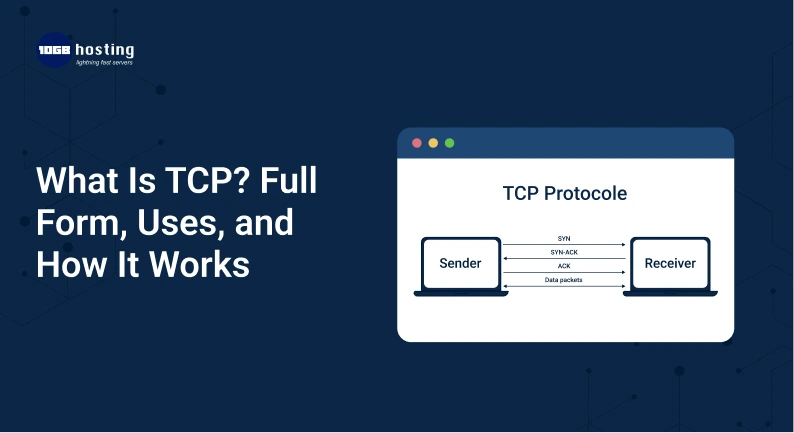
1. Setting up the connection (3-way handshake)
TCP sets up a connection via a 3-way handshake before transferring data.
- SYN → The sender asks to start a conversation
- SYN-ACK → The receiver says they got it
- ACK → The sender confirms. Now the connection is made.
2. Dividing up data
TCP splits up big pieces of data into smaller packets (segments).
For example:
- A big file is split up into smaller bits and supplied one at a time.
3. Sending Data
Every packet is supplied with:
- The number of the sequence
- Address of the destination
- Information for checking errors
4. Checking for mistakes and saying thank you
After getting the data:
- Receiver looks for mistakes
- Sends an acknowledgement (ACK) for packets that have been received
If any packets are missing:
TCP sends it again on its own.
5. Putting the data back together
When you get there:
- The packets are put back in the right sequence.
- Rebuilding the original data
6. Ending the connection
After talking:
- TCP safely ends the connection.
Example of TCP in the Real World
Let’s say you’re getting a file.
Without TCP:
- The file might be broken.
- Some parts may be missing.
- Data might not come in the right order.
With TCP:
- The file comes in full, and the data is correct.
- Everything is in the right order.
- That’s why people use TCP to send crucial info.
How TCP Is Used
People use TCP a lot while they are on the internet.
Things that are often done:
1. Browsing the web (HTTP/HTTPS)
TCP ensures that the page loads correctly when you access a website.
2. Email Services
SMTP, IMAP, and POP3 are all protocols that use TCP to send email reliably.
3. Transfers of files (FTP)
TCP is used to safely download and upload files.
4. Transactions and banking online
TCP is necessary because sensitive data needs to be accurate and safe.
5. Apps for messaging
TCP is what apps like WhatsApp use to send messages safely.
Why TCP Is Important (Pros)
1. Communication that is dependable
TCP makes guarantees that no data is lost while it is being sent.
2. Finding and fixing mistakes
TCP repairs things automatically if they go awry.
3. Delivery of Data in Order
Data gets there in the exact sequence it was sent.
4. Control of congestion
TCP changes speed based on how busy the network is to keep it from getting too busy.
5. Safe Data Transfer
TCP itself isn’t encryption, although it works with secure protocols like HTTPS.
When to Use TCP and When to Use UDP
Knowing what TCP and UDP are will help you pick the proper protocol.
When to Use TCP
- It’s crucial that the data is correct.
- You’re sending emails or files
- You need to be able to talk to each other clearly.
When to Use UDP
- Faster is better than more accurate.
- Live streaming or playing games
- Apps that work in real time
A Simple Way to Understand TCP
TCP is like a delivery service that lets you track your package:
- You mail a package.
- The courier says the package has been delivered.
- It sends again if something is lost.
- Everything gets there securely.
UDP, on the other hand, is like sending postcards: it’s quick but not always reliable.
Common TCP Ports You Should Know
TCP uses port numbers to identify services.
| Port | Service |
| 80 | HTTP |
| 443 | HTTPS |
| 21 | FTP |
| 25 | SMTP |
| 110 | POP3 |
Actionable Insights for Beginners
Here are some helpful ideas if you’re learning how to network or run websites:
✔ Understand the Basics of TCP
Knowing how TCP works can help you fix problems with your website or server.
✔ Use TCP for Important Apps
When reliability is important, always choose TCP.
✔ Keep an eye on how well the network is working
TCP-related delays can occasionally make websites load slowly.
✔ Know the difference between TCP and UDP
This is a typical question for interviews and tests.
Questions that are often asked (FAQs)
1. What is TCP in plain English?
TCP is a set of rules that makes sure that data is sent over the internet in the right order, entirely, and accurately.
2. What is the TCP and UDP protocol?
TCP and UDP are ways for computers to talk to each other. TCP is slower but more reliable, while UDP is faster but less reliable.
3. What makes TCP slower than UDP?
TCP is slower since it checks for mistakes, makes sure the data is correct, and validates delivery.
4. Where is TCP used?
People use TCP to browse the web, send emails, transfer files, and do business online.
5. Is TCP safe?
TCP itself isn’t secured, but it works with secure protocols like HTTPS to make sure that data is sent safely.
Final Thoughts
One of the most important parts of the internet is TCP (Transmission Control Protocol). It makes sure that data moves safely, correctly, and in the right order. This is important for everything from sending emails to accessing the web.
Knowing what TCP is and what TCP and UDP are will provide you a solid foundation in networking and help you grasp how the internet operates behind the scenes.
Call to Action
Want to know more about networking, hosting, and how the web works?
Check out our other tutorials or contact us to find out about high-performance hosting options that use optimised TCP/IP settings to make your site run quicker and more reliably.
Stay connected and up to date!