Choosing a domain name is easy until you find the perfect name and discover that someone else owns it. Even worse, you may find a domain that appears to be available but has a confusing ownership or registration history.
And that’s where a WHOIS domain search can help.
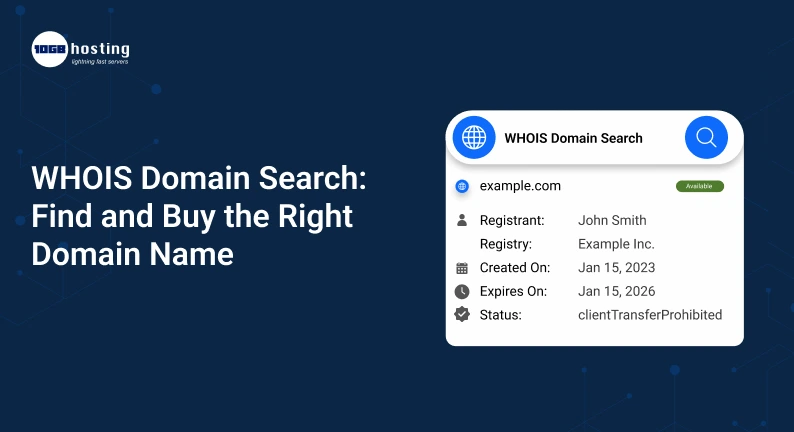
A WHOIS search lets you check important information about a domain, including registration status, registrar, creation date, expiry date and, if publicly available, details about the domain registrant. This can help you research a domain before you buy it and help you avoid making a bad choice.
Whether you’re building a business website, starting a blog, creating an online store, or looking for a good domain to buy, knowing how WHOIS works can help make your domain research much easier.
In this guide, we will tell you what WHOIS is, how a whois domain search works, how to check domain information, how to find the right domain name and what to consider before buying one.
Table of Contents
What is a WHOIS Domain Lookup?
A WHOIS domain search is a tool or service used to look up registration information related to a domain name.
For example, let’s say you want to purchase:
mynewbusiness.com
Before you buy it, you can do a WHOIS search to see if the domain is registered and to review information such as:
- Domain status of registration
- Name of Registrar
- Date of registration
- Date of expiry
- Date updated
- Name servers
- Domain status codes
- Privacy or proxy protection status
In some cases, the registrant information may also be displayed. However, privacy laws, registrar policies and privacy-protection services may obscure personal information.
WHOIS is primarily used for domain research, verification, troubleshooting, and any ownership-related checks.
How does WHOIS work ?
Your registration information is stored via the domain registration system when you register a domain.
A WHOIS lookup is a query to a publicly available registration database and returns the data that can be legally and technically displayed.
The process is easy peasy.
- Type a domain name into a WHOIS search tool.
- The tool checks the domain’s registrar info.
- You receive the available information on the domain.
- Check domain status and find out if it is registered or not.
- If the domain is available, you can go ahead and register it.
For example, if you look up examplebusiness.com, it could tell you it is registered, with whom it is registered, when it was created and when it will expire.
This will give you valuable information before you buy.
Why do a WHOIS domain search before you buy?
Buying a domain isn’t just about finding a name that sounds good. And you need to know the domain is available, trustworthy and appropriate for your business.
You can research these details on a website and you can do this before you spend any money.
1. Check if a domain is registered
The first and most obvious use is to check domain availability.
If the domain isn’t registered, you might be able to register it right away.
If it’s already registered you can look for alternatives or see if the owner might be willing to sell it
2. Know the domain history
The date of registration may also provide useful context.
For example:
- A domain that has just been registered might have little history.
- Another business might have had an older domain.
- A domain with a long history may require further research prior to purchase.
Older domains are not necessarily better. Its past use and reputation also play a role.
3. Check the Domain Expiration Date
Sometimes, the WHOIS info shows when a domain registration expires.
This can be useful if you are interested in obtaining a domain that is presently registered.
But an expiration date does not mean the domain will automatically be available on that date. Domain owners can renew their registrations, and registrars can require more processes after the expiration date.
4. Identify the registrar
WHOIS results may also show who is managing the domain.
This comes in handy when you need to:
- Confirm registration details
- Know where the domain is managed
- Diagnosing issues with domains
- Contact the registrar for proper assistance
5. Do Your Domain Research Before You Buy
If you are considering buying a premium or used domain, do your research before paying.
That research includes a WHOIS lookup.
And you should also look at the domain’s:
- Old website
- Reputation Search
- Backlink profile
- Brand Story
- Trademarks danger
- Spam history
- Existing mentions online
How to Do a WHOIS Domain Search
WHOIS lookups are usually easy.
Step 1: Select a WHOIS Lookup Tool
Use a trusted WHOIS search engine or a domain registrar with a WHOIS search feature.
Choose a service that offers transparent domain status and registration details.
Step 2: Type in the Domain Name
In the search field enter the domain you want to research.
For instance, you might say:
yourbusiness.com
You can also search for different extensions:
- .com
- .net
- .org
- .com
- .co
- .store
- .tech
Step 3: Check the Results
I’m going to make him pay for it.
- Status of registration
- Registration
- Date Created
- Expiry date
- Updated on date
- Servers Name
- Status domain
Some information may not be available to protect privacy.
Step 4: Availability Check
If the domain is available, you can start the registration process.
If it is registered, do not give up straight away.
You might think:
- Another extension
- A changed company name
- Another keyword combination
- Contacting current owner
- Looking for another area
Step 5: Do Your Homework Before Buying
If you are buying a registered domain from someone else, do some additional research before you complete the deal.
Do not simply choose based on the domain name.
Choosing the Right Domain Name
A good domain is easy to remember, relevant to what you do, and simple enough for customers to type.
A few practical tips are:
Be Brief
Short domains are easier to remember and easier to communicate.
Examples:
brighttech.com
is remembered more than:
thebestandmostaffordabletechnologycompany.com
Don’t use unnecessary words but you don’t need a super short domain.
Easy to Spell
If your customers often ask, “How do you spell that?” your domain may be too complicated.
Avoid misspellings unless you have a strong branding reason.
Use Your Brand.
Try to get a domain that matches your brand name, if possible.
For example, a company called BrightNest might consider:
brighnest.com
Having a matching domain makes your business easier to find and remember.
Think About Your Audience
Your domain needs to be relevant to the people you are trying to reach.
A local business may choose a country specific extension like .in whereas a global business may prefer .com when available and appropriate.
Here are some common considerations for choosing a name for your new business.
Numbers and hyphens can sometimes make a domain name harder to say.
For example, if your business name is “Five Star Digital” a domain with lots of numbers and hyphens can confuse people.
Keep the name simple where possible.
WHOIS Domain Search and Domain Availability Search
The two searches are related, but they are not exactly the same.
A domain availability search, mainly, gives you:
“Can I register this domain?”
WHOIS domain search provides registration information for a domain already registered or with registration data associated with it.
For example:
Verify that the domain is available:
Is mycompany.com free of cost?
WHOIS search:
Who’s the registrar? When was the domain registered? What’s the expiry date? What is the state of it today?
Combining both types of searches can give you a better idea when choosing a domain.
What Information Can You Find Through WHOIS?
The exact information available depends on the domain extension, registrar, registry policies, and privacy protections.
Common information may include:
| Information | What It Tells You |
| Domain name | The domain being researched |
| Registrar | Company managing the registration |
| Creation date | When the domain was registered |
| Expiration date | Current registration expiration |
| Updated date | When registration information was last changed |
| Domain status | Current registration state |
| Name servers | DNS servers associated with the domain |
| Registrant information | May be restricted or privacy-protected |
Why Doesn’t the Domain Owner Always Show Up?
This is a very important point for the beginners.
A WHOIS lookup will not always include a person’s name, email address, phone number or physical address.
Many domain registrations are done through privacy/proxy services. Further, the publication of personal information may be limited by applicable privacy rules.
So when you do a domain owner search and you don’t see that information about the personal domain owner, it doesn’t mean that the domain has no owner.
That usually means the info is not posted in a public space.
Sample: Using WHOIS Before Buying a Domain
Imagine that you’re launching an online clothing store, UrbanThread.
You discover:
urbanthread.com
Sounds perfect, but the domain is already registered.
You do not buy another domain immediately, instead you do a WHOIS search.
You find out:
- The domain has been around for several years.
- It’s registered with a well known registrar.
- The registration is valid until some future date.
- Details of ownership, protected for privacy.
You then dig into the previous website and online reputation of the domain.
If the domain was used for a legitimate clothing related business in the past it might be worth looking into more.
But if it’s been associated with spam, misleading content or unrelated activity in the past, you might choose another domain as safer.
This is why a WHOIS lookup should be part of a larger domain research process.
Things to Look for Before Buying an Existing Domain
And don’t buy a registered domain just because of the name if someone tries to sell it to you.
See if it’s been used before
Check for mentions of the domain and look for archived versions of the website, if relevant.
Check for Trademark Issues
Great domain names are useless if they end up in a trademark dispute.
Make sure you do your due diligence on trademarks and seek professional legal advice when necessary before purchasing a domain that capitalises on another company’s brand name.
Check its SEO history
If you are buying a domain for SEO purposes because you think the previous authority will help then check it out thoroughly.
Search for:
- Suspicious backlinks
- Spam pages
- Automated link building.
- Sanctions previously
- Unrelated content
- Sudden change of ownership or use
Never assume an old domain is SEO-friendly.
Confirm transfer process
If you buy a domain from someone else, be aware of how the domain transfer is done.
Be sure you know:
- Who is the current owner of the domain?
- Who operates it Which registry
- How will ownership be transferred
- Can I transfer the domain?
- Costs involved
For high value transactions use a trusted domain marketplace or escrow process.
Benefits of Using WHOIS to Investigate a Domain
WHOIS lookup is beneficial to entrepreneurs, marketers, developers, and website owners.
Improved purchasing decisions
You can research a domain before you purchase it.
Better domain planning
You might want to look at different domain names and extensions.
Ownership of Research
If available publicly, WHOIS information can help you identify registration-related details.
Existing domain owners can use their registration information when they are troubleshooting or managing their domains.
Research Competition
Businesses can study domain registration trends and how competitors build their online presence.
Risk Mitigation
A little research on a domain before you purchase it can help you find out about potential problems sooner rather than later.
Mistakes to Avoid
Choosing a Domain Just Because It’s Available
Availability does not equal a good domain.
Check for branding, spelling, relevance and any possible legal issues.
If WHOIS Shows Everything
Privacy protection can hide personal registration information.
Assuming that missing information is something suspicious.
Ignore Domain History
If you’re buying an existing domain, check out what it was used for before.
Buying too quick
Premium domains are often quite pricey. Spend time researching before paying.
Renewal Cost Forget fulness
It may not just be the cost of registering as a first year student. Check renewal pricing and any additional services before you buy.
5 Quick Tips When Choosing a Domain
Use this checklist before registering your next domain:
- Keep it simple – Choose a name that people can easily remember.
- Relevance – Link the domain to your brand or business.
- Check availability – Before you settle on your choice, a domain search will tell you if it’s free
- Research Registered Domains – Conduct a WHOIS search on an existing domain you are researching.
- Think long term – Pick a name that will grow with your business.
WHOIS Domain Search Frequently Asked Questions
1. What is a WHOIS domain search?
A WHOIS domain search is a lookup that reveals available registration information about a domain name. Depending on the domain and its privacy settings, it can display information such as the registrar, registration dates, domain status, name servers, and so forth.
2. Can I look up domain owners with WHOIS?
Sometimes. Not all the time. Privacy or proxy protects many domains and private information may not be available publicly. A WHOIS search may still give other useful registration information.
3. Are WHOIS records always correct?
WHOIS information is managed by the domain registrars and registries . The domain extension and the system used to register a domain determine what you can see . Protection of privacy can also restrict what is visible in public.
4. Can WHOIS tell whether a domain name is taken?
A WHOIS search can tell you if a domain name is registered, but if you want to buy a domain name, you should use a live domain availability search, provided by a registrar.
5. Do I have to check WHOIS before buying a domain?
Yes. If you already have a domain name registered, a WHOIS lookup will provide you with the registration status, registrar, dates and other information available. Also before you buy, you should check its history, trademarks and reputation.
Final Thoughts: Use WHOIS Before Buying
Choosing the right domain name is an important step when you’re setting up an online business. A good domain will support your brand, make your website easier to remember, and give your customers a clear path to find you.
However, you should not just select a domain because it is available.
A WHOIS domain search is another layer of information for you to make a smarter decision. Check the registration details, examine the status of the domain, research the existing domains and discover the possible problems before you invest your money.
When you are ready to launch your website, begin by creating a short list of relevant domain names. Check availability, do a whois domain lookup when needed, check their history and compare registration and renewal costs.
Ready to discover your perfect domain name? Start your domain search today, compare the available options and register the domain that suits your brand and long term business goals.