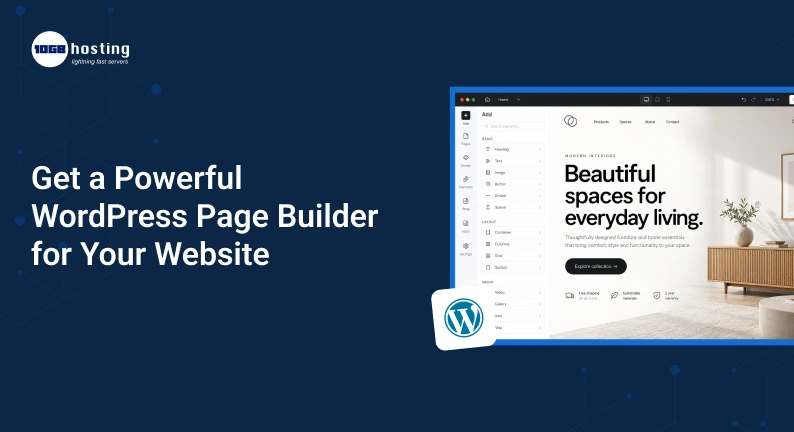
Building a professional website used to require hiring a developer, learning complex coding, or hours of tweaking website layouts. Now it is much easier. WordPress page builder with powerful functionality to create beautiful, responsive and functional web pages without advanced coding knowledge.
Whether you’re building a business website, online store, portfolio, blog or landing page, the right page builder can save you time and give you more control over your website design.
But with so many WordPress tools out there, how do you know which one is right for your website? What is a WordPress page builder? How does a WordPress page builder work? What features should you look for? How to choose a WordPress page builder that works great with reliable best WordPress hosting sites and best website hosting for WordPress?
Table of Contents
What Is a WordPress Page Builder?
A WordPress page builder is a plugin or tool that helps you create and customize website pages using a visual interface, without having to write code manually.
In the standard WordPress editing experience, you may have to work with blocks, themes, CSS or custom code. More visual control with a page builder. Depending on your builder, you can usually add elements such as:
- Text
- Images
- Video
- Buttons
- Contact Form
- What people say
- Price tables
- Art Gallery
- Sliders
- Columns and sections
- Social Media Features
- Call-To-Action Areas
Drag and drop functionality is used by many builders. You can choose an element, place it on your page and customize its appearance.
This can make setting up a website feel a lot less daunting for newcomers.
Why Use a Page Builder for WordPress?
WordPress is already a flexible CMS but it can still take time to make each page exactly how you want it to look.
A good WordPress page builder adds yet another level of design flexibility.
Think about if you run a small digital marketing company. You want a homepage with a headline, service cards, customer testimonials, pricing section and a contact form.
Without a page builder, you might have to work with your theme settings or have a developer make some changes.
With a page builder, you can usually build these sections visually and drag and drop them around whenever you want.
Main reasons companies choose page builders
- Build website faster
- Fewer developer dependencies
- More design freedom
- Landing page creation made easier
- Design sections for re-use
- Responsive Design Features
- Improved control page layouts
- Simpler website updates
This is especially helpful for companies that frequently launch campaigns, services, products, or promotional pages.
What to Look for in a Powerful WordPress Page Builder
Not every page builder has the same experience. Before you choose a website, consider what features are really important to your website.
1. Drag and Drop Editing
A simple visual editor should make it easy for you to move around elements of your website.
Find an editor that allows you to create columns, sections, buttons, images and other elements without knowing HTML or CSS.
The simple goal: to see what you’re building as you’re building it.
2. Responsive Design Controls
A website may look good on a desktop, but be difficult to use on a smartphone.
A good page builder should let you build designs that will work across:
- Desktop computers.
- Laptops
- Tablets
- Cell phones.
Search for settings to change spacing, font sizes, image sizes, layouts for different screen sizes, etc.
3. Pre-Built Templates
For beginners, starting with a blank page can be difficult.
Pre-designed templates give you a head start. Import a layout and replace the sample content with your own.
Templates are great for:
- Websites for Business
- Conversion Pages
- Pages of service
- Pages of Products
- Portfolios
- Blogs
- Event Page
- Lead Generation Page
You don’t have to copy a template word for word. Use it as a framework and adapt it to your brand.
4. Reusable Blocks
Let’s say you have a call to action section that you want to use on 5 different pages.
Doing it again 5 times is a waste of time.
Save frequently used designs for reuse, or add them to other pages using reusable sections. This is especially helpful for companies with large websites.
5. SEO Friendly Structure
A good looking website is not enough. Search engines need to know what your content is, too.
When assessing a page builder, check how well it plays with common SEO practices, such as:
- Correct heading structures
- Neat page layouts
- Optimise images
- Mobile Friendly Design
- Rapid loading
- Links with description
- Simple metadata management with SEO plugins
A page builder should be a complement to your SEO strategy, not an unnecessary complication to your website.
How to Pick the Best WordPress Page Builder
Knowing what your website needs will make it easier to select the right tool.
Step 1: Identify Your Website Goals
Before you install anything, think to yourself, “What am I trying to build?”
Are you making:
- A corporate website?
- Open a shop online?
- Personal Blog?
- A portfolio?
- Landing page?
- A membership site?
- Like a lead gen web-site?
A simple blog doesn’t need to have the same features as a large e-commerce website.
Step 2: Evaluate Ease of Use
If you are not comfortable with coding, choose a builder with a friendly visual interface.
Play with the editor for a while before you buy into it.
Ask yourself this:
- Are sections easy to add?
- Yes you can change fonts and colours.
- Yes you can make columns.
- Can I see mobile designs?
- Can I un-do changes?
- Can I save layouts to use again.
If simple things seem difficult, another builder may be the better way.
Step 3: Monitor performance
Website speed matters to users as well as search visibility.
Loading performance can be affected if a page builder adds extra scripts or generates bloaty pages.
Mind, it doesn’t mean you should avoid page builders altogether. Instead, be cautious with a builder and pair it with:
- Quality WordPress hosting
- Images Optimised
- Caching
- A dark theme
- Minimal useless plugins
- A content delivery network where applicable
Your hosting environment is also important. A well-designed website can still fail if it is on an unreliable or poorly optimised server.
Step 4: Check Theme & Plugin Compatibility
You should make sure that your page builder plays nice with your WordPress theme and other important plugins.
Always check for compatibility before installing a builder on a live website and test it on a staging environment if possible.
This is particularly relevant if your website already has:
- An e-commerce plug-in
- SEO plugin
- Contact form
- Security Tools
- Features for members
- Integrations with analytics
Step 5: Compare Rates
Many page builders offer free and premium versions.
The free version might be sufficient for a simple website. With premium plans you get advanced widgets, templates, theme building, marketing tools and more design controls.
Don’t choose a tool just because it has the most features.
Make a comparison of the features you actually need instead.
WordPress Page Builder vs. Traditional WordPress Editing
Both approaches have their place.
Traditional WordPress editing can be a good choice for users who prefer simple content creation and lightweight pages.
A page builder can be more useful when you need detailed visual control.
| Feature | Traditional Editing | Page Builder |
| Visual design control | Basic to moderate | High |
| Custom layouts | Moderate | High |
| Drag-and-drop editing | Limited | Usually available |
| Templates | Available | Usually extensive |
| Advanced landing pages | More work | Easier |
| Coding requirement | Sometimes | Often minimal |
| Reusable designs | Depends on setup | Common |
The best choice depends on the type of website you’re building.
How Hosting Affects Your WordPress Site
People get caught up in themes and page builders and forget about hosting.
The page builder on your WordPress site determines how you build the site, whereas hosting provides the environment in which the site runs.
Choosing the right website hosting for WordPress can make a big difference in website reliability, speed, security, and scalability.
Things to consider when comparing hosting providers:
Performance
You must ensure your hosting plan has enough server resources to handle your website traffic and plugins.
Up time
Downtime happens too often and costs you visitors, leads, and sales.
Security
Look for features such as SSL support, malware protection, backups and server level security.
WordPress Assistance
Troubleshooting becomes a lot easier if you go with a hosting provider that really knows WordPress.
Ability to scale up
Your hosting should be able to grow along with your website.
A small business website, for example, might begin with a basic hosting plan. As your traffic grows, you may eventually need a more high performance hosting environment.
Real World Example: Building a Service Business Website
Imagine a local web design company that is looking to update its website.
The company requires:
- A professional home page
- Single Service Pages
- Customer Reviews
- Portfolio section
- Contact forms.
- Landing Pages for Lead Generation
- Mobile layouts
Instead of having to create every layout from scratch, the team can use a WordPress page builder to create a basic design system.
They could design a reusable design for a service card, CTA section, testimonial layout, and footer section.
When they add a new service, they can build on these rather than starting from scratch.
This can speed up and make more consistent the management of the website.
Benefits of Using a WordPress Page Builder
A good page builder can offer some practical benefits.
Quicker Website Development
With visual editing you can build and change pages much more quickly.
Greater Design Freedom
You aren’t always restricted to the layout provided by your WordPress theme.
Easier Updates
You can make changes without contacting a developer for every small adjustment.
Better Landing Pages
Dedicated landing pages are often needed for marketing campaigns. A page builder helps make creating and testing different layouts easier.
Consistency of Brand
You can keep the colours, typography, buttons, spacing and other design elements consistent throughout your website.
Good for non technical users
Website layouts can be managed by business owners, marketers and content teams without extensive development knowledge.
Frequent errors to avoid
Even a powerful tool can bring problems if used improperly.
Overusing Plugins
Do not install multiple page builders just to test their features. Too many plugins can make website management more complicated.
Disregarding Mobile Design
Be sure to always test your pages on smaller screens before publishing.
Having Too Many Animations To
Animations are a good way to make a page look interesting but too much effect can distract visitors and influence the performance.
Features rather than Performance
More widgets will not make the website better.
Look at features that align with your business goals.
Ignoring Backups
Always have reliable backups before making major changes to your website.
How to Make Better WordPress Pages
Once you have your page builder installed, use it wisely.
Keep your layout simple.
Visitors should be able to understand your website without working hard.
Use clear sections and tell visitors what to do next.
Use strong calls-to-action
Use action-oriented copy instead of vague buttons like “Click Here”.
- Start Now
- Get A Quote
- Book Consultation
- View our service
- Test it out for free
Optimise your images
Big image files can bog down your website. Before uploading, resize images and choose appropriate formats.
Visual Consistency
Limit the fonts and brand colours you use on your website.
Consistent websites seem more professional.
Test Before You Post
Please review:
- Desktop design
- Mobile Layouts
- Tablet design
- Links
- Types
- Images
- Buttons
- Page speed
- Site navigation
A few minutes of testing can save a frustrating user experience.
Is a Page Builder Useful for WordPress?
Yes, for many site owners.
If you’re often building landing pages, customising layouts, promoting products or updating parts of your website, a page builder can save you a tonne of time.
But you don’t need the most expensive or feature-loaded option.
And the best solution is the one that fits your skills, website needs, performance expectations, and budget.
Combining a reliable page builder with the best WordPress hosting sites gives you a better base for creating and managing your website.
FAQ (Frequently Asked Questions)
1. Best WordPress Page Builder for Beginners?
The best choice will depend on your needs, budget and preferred style of editing. As a beginner, you should generally look for a builder with an intuitive interface, templates, responsive controls and reliable documentation.
2. Do you need to code for WordPress page builder?
Most page builders today are designed to reduce the need for coding. You can generally create layouts with visual controls. But some basic knowledge of HTML or CSS can be a plus when you want to make further customisation.
3. Does a page builder slow down my WordPress website?
It can – depending on how the builder generates page elements, and how heavily you use its capabilities. Good hosting, image optimisation, caching, a lightweight theme and careful plugin management will help.
4. Can I use a WordPress page builder with any hosting?
Most WordPress page builders work on standard WordPress hosting. However, the hosting performance and server resources available can affect your website’s overall experience. Select the top WordPress hosting that offers optimal performance, security, support, and scalability.
5. Should I Use a Page Builder for My Business Website
If you want to have more control over your design and plan on creating or modifying pages often, a page builder is a practical option. It can enable your team to make updates without having to work with a developer for every change.
Summary
A website’s got to be more than an online brochure. It needs to reflect your brand, guide visitors to the information they need, generate leads and support your business objectives.
A good WordPress page builder can help make this easier by giving you greater control over layouts, design, content sections and landing pages.
Ease of use, responsiveness, performance, templates, compatibility, pricing, and the quality of your hosting environment are all things to consider before you decide on one. And don’t forget, a beautiful design won’t provide the best experience if your website is slow or often down.
When you’re ready to build a faster, more flexible, and professional WordPress website, choose a page builder that matches your goals and combine it with reliable WordPress hosting. Start building your pages today and make your website a more powerful tool for attracting visitors, generating leads, and growing your business.